Create PDF
PDFgear lets you create a blank PDF right on your iPhone or iPad. You can also create folders in PDFgear to keep your files organized.
Create an Empty PDF
- Tap the blue “+” button and select Create empty PDF.
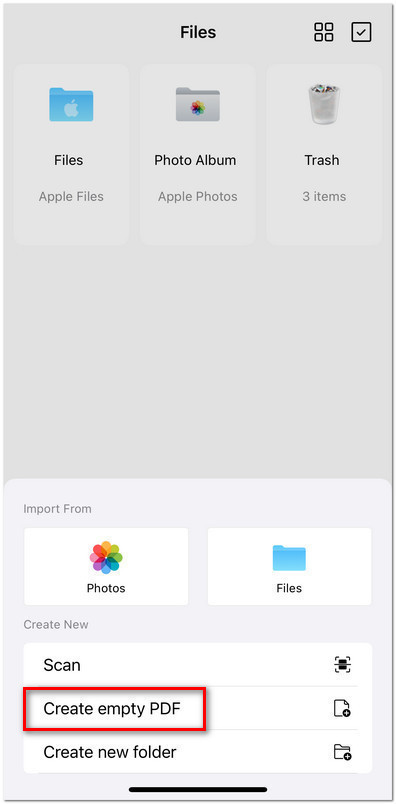
Create Empty PDF in PDFgear on iOS
- On the Paper Style screen, choose your preferred template: Blank, Notes, Grid, Dotted, or To Do.

Choose the Paper Style
- A new PDF will be generated and saved in your Files tab, ready for editing.
Create a New Folder
- Tap the blue “+” button and select Create new folder, then name it.
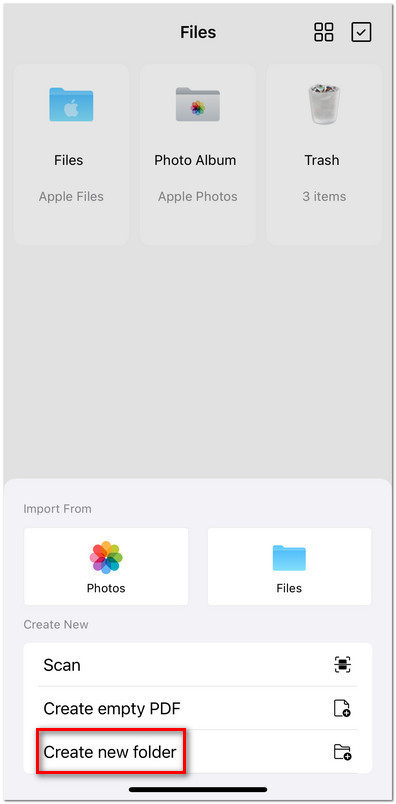
Choose to Create New Folder in PDFgear
- Now you can move your files into the folder to keep them organized.