What Is an Electronic Signature and When Should You Use One?

Summary :
Learn what an electronic signature is, how it works in PDFs, common e-signature types, legal validity, safety limits, and when to use it.
Table of Contents
A PDF electronic signature is a typed name, drawn mark, uploaded signature image, or other electronic symbol added to a PDF to show signing intent. It is commonly used for forms, approvals, agreements, and everyday documents.
This guide explains what a PDF electronic signature is, what it can and cannot prove, when it may be legally valid, how secure it is, and when a digital signature may be the better choice.
What Is an Electronic Signature?
An electronic signature is any electronic mark that shows a person’s intent to sign or approve a document. It is often called an e-signature or eSign. In a PDF, it usually appears as:
- Typed name
- Drawn signature
- Uploaded signature image
Also worth knowing: Initials, dates, and approval records are often added alongside an electronic signature. They help show when, where, and how the document was approved, which can make the signing record clearer.
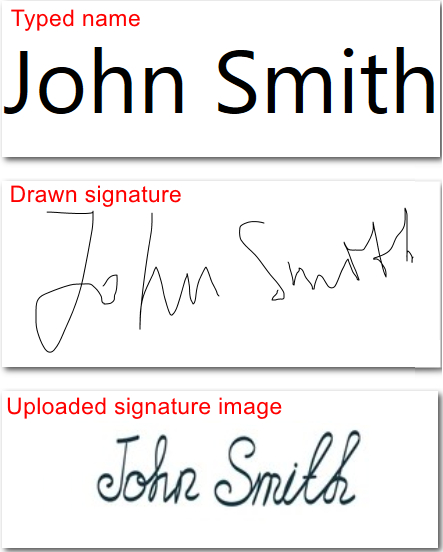
Examples of Electronic Signatures in PDF
Key takeaway:
A basic electronic signature answers one simple question:
“Did someone intend to sign this document?”
Its primary purpose is to indicate signing intent, not to provide strong identity verification automatically. The level of evidence an electronic signature carries depends on factors such as the document type, the signing process, identity verification, and the records kept during signing.
The table below shows what it can and cannot prove.
| A basic PDF electronic signature can show… | But it may not prove by itself… |
| The signer intended to approve the document | The signer’s identity was verified |
| A visible signature, typed name, or initials were added | The document hasn’t been modified after signing |
| A signed copy of the PDF was created | Additional verification or supporting records exist |
That’s why electronic signatures are commonly used for forms, approvals, agreements, and other everyday documents, but they may not be enough for documents that require strong identity verification, tamper detection, or formal compliance.
How Electronic Signatures Work in PDF
Unlike a handwritten signature on paper, an electronic signature in a PDF is added as a digital element to indicate that someone has approved or accepted the document. It can be placed in a signature field, on a blank area of the page, or anywhere a signature is required.
When an electronic signature is added to a PDF, it usually does four things:
| What happens | Why it matters |
| A visible signature is added | It may be typed, drawn, uploaded, or added as an approval mark |
| Signing intent is recorded | It indicates the signer approved the PDF electronically |
| Supporting records may exist | Some workflows include email verification, timestamps, or audit trails |
| Trust level varies | A basic e-signature may not verify identity or detect later changes |
In short, an electronic signature in a PDF is more than just a picture of a signature. It combines a visible signature with your intent to sign, while the overall level of trust depends on the signing process and any supporting verification or records.
What Do Electronic Signatures Look Like?
PDF electronic signatures usually come in three forms: drawn signatures, typed signatures, and uploaded signature images. All of them can show signing intent, but they look and feel different in actual documents.
Drawn Signature
A drawn signature is created with a mouse, touchpad, finger, or stylus. It looks closer to a handwritten signature, so it works well when you want the PDF to feel more personal or familiar.
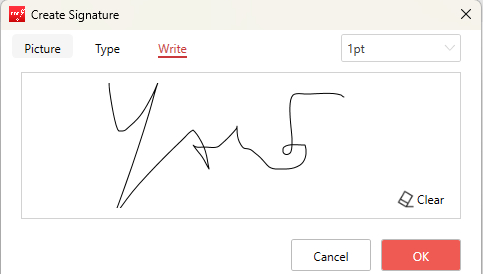
Draw Your Signature Electronically
Downside:
Drawing with a mouse can look uneven, and small screens may take a few tries.
Typed Signature
A typed signature uses your name in a regular font or a handwriting-style font. It is often the fastest option for simple forms, internal approvals, and low-risk documents.
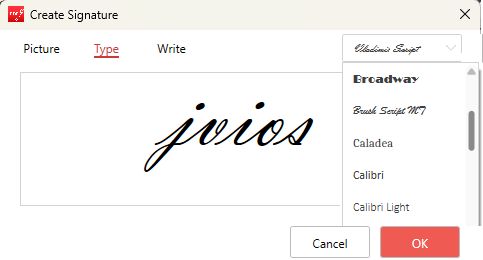
Type Your Signature Electronically
Note:
It may not look as personal as a handwritten signature, but it can still show that you intended to sign the PDF.
Uploaded Signature Image
An uploaded signature image is a scanned or photographed version of your handwritten signature placed into the PDF. This is useful when you already have a clean signature image and want to add a signature image to a PDF for a consistent look across documents.
For the best result, use a clear image with good contrast, proper cropping, and a transparent or clean background.
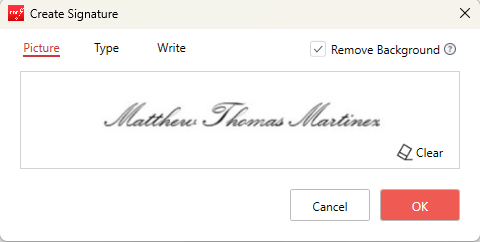
Add Your Signature Image Electronically
Downside:
A poor-quality image can look messy or unprofessional.
There is no single best format for every PDF. For everyday documents, a typed, drawn, or uploaded signature can all work. The better choice depends on how formal the document is, how you want the signature to look, and whether you need to sign a PDF with extra verification or supporting records.
Are Electronic Signatures Legally Binding?
For many everyday documents, yes. Electronic signatures are legally recognized in many countries, including the United States under the ESIGN Act and UETA, and in the European Union under eIDAS. Many other countries have similar laws, although the exact requirements vary.
However, a signature alone doesn’t determine whether it’s legally binding. What matters is whether the signing process provides enough evidence that the signer agreed to the document.
This often includes things like:
- Clear intent to sign.
- Consent to use electronic signatures.
- A way to identify the signer.
- A reliable copy of the signed document.
- Supporting records such as timestamps or an audit trail.
As a result, electronic signatures are commonly accepted for documents such as HR forms, school paperwork, routine agreements, and many business contracts. However, some government forms, regulated industries, or high-value transactions may require stronger identity verification or additional signing requirements.
A quick note:
This article provides general information only and is not legal advice. Always check the legal requirements that apply to your document and jurisdiction.
Are Electronic Signatures Secure? Key Risks to Know
Electronic signatures are generally secure for everyday documents, but like any digital tool, they aren’t completely risk-free. The biggest risks usually come from how the signature or document is handled, rather than the signature itself.
1. Someone could reuse your signature
If you share a clear image of your handwritten signature, someone else may copy and reuse it without your permission. Avoid storing or sending signature images unless necessary.
2. Your document may contain sensitive information
When signing confidential PDFs online, choose a trusted service and understand how your files are processed. If privacy is a top priority, consider using an offline tool like PDFgear software, where your files stay on your device.
3. The document could be edited later
A basic electronic signature doesn’t automatically show whether a PDF has been changed after it was signed. If tamper detection is important, consider digitally signing the document instead.
4. Identity isn’t always verified
A typed name or signature image doesn’t necessarily prove who signed the document. When signer identity matters, a workflow like eSignGear can add verification, timestamps, and an audit trail to create stronger evidence.
In practice:
For everyday forms and approvals, these risks are usually manageable. For sensitive, regulated, or high-value documents, choose a signing workflow with stronger protection and supporting records.
When to Use an Electronic Signature in PDF
An electronic signature is a good fit when you need a quick, visible way to approve or return a PDF without printing it. It works especially well for everyday documents where the main goal is to show agreement, not complete a complex verification process.
You can use an electronic signature for:
- Routine PDF forms
- Internal approvals
- HR or school paperwork
- Simple agreements
- Client confirmations
- Low-risk documents sent by email
In these cases, a typed, drawn, or uploaded signature is usually enough to complete the document.
When to be more careful: For high-value, regulated, or identity-sensitive documents, a basic electronic signature may not be enough. Consider a signing workflow like eSignGear, which offers stronger verification, audit trails, and supporting records.
Electronic Signature vs Digital Signature
Although both electronic signatures and digital signatures are used to sign PDFs electronically, they serve different purposes.
An electronic signature is the broader concept. It includes a typed name, a drawn signature, an uploaded signature image, or another electronic mark used to show that someone intended to sign a document.
A digital signature is a more secure type of electronic signature. It uses digital certificates to help verify the signer’s identity and detect changes made after signing.
Here’s a quick way to decide:
- Choose an electronic signature for everyday forms, approvals, and routine agreements.
- Choose a digital signature when identity verification, document integrity, or regulatory compliance is required.
Still not sure which one to use? Learn the difference between electronic and digital signatures before signing important documents.
FAQs
Can I electronically sign a PDF for free?
Yes. You can use PDFgear Online Signer to type, draw, or upload a signature and place it on your PDF. It works directly in your browser, so your file does not need to be uploaded, which helps protect your privacy.
If you want to save and reuse electronic signatures later, you can also download PDFgear desktop software to access more advanced signing features for free.
Is typing my name in a PDF an electronic signature?
If you type your name in a PDF to show that you agree to or approve the document, it may function as an electronic signature. However, the strength of the evidence depends on the document and the signing process.
Is a scanned handwritten signature the same as an electronic signature?
A scanned handwritten signature can be used as an electronic signature when you add it to a PDF to show signing intent. However, it is not the same as a certificate-based digital signature.
Can I sign a PDF without Adobe Acrobat?
Yes. You can sign a PDF with PDFgear Online Signer without creating an account to create a free electronic signature for PDF documents online. Drag and drop your file, create an electronic signature by drawing, typing, or uploading an image, place it in the PDF, and download the signed file.
You can also fill out a PDF form before signing it with PDFgear Online Signer.
Why can’t I sign or save my PDF?
This may happen if the PDF is password-protected, restricted, opened in a viewer that doesn’t support saving changes, or requires a specific signature field. If you’re signing a secured PDF, you may need permission to edit or sign it before saving the document.
When should I use a digital signature instead?
Use a digital signature when you need stronger identity verification, document integrity, or certificate-based validation. It is usually a better choice for regulated, high-value, or legally sensitive documents.
Conclusion
An electronic signature is a simple and convenient way to sign PDFs, forms, agreements, and many other everyday documents. In most cases, a typed, drawn, or uploaded signature is enough to show your intent to sign.
If you’re ready to sign a PDF, you can do it online in just a few clicks. If you need certificate-based signing or stronger verification, choose the signing method that best matches your document and legal requirements.
